
Two years ago, at the onset of Covid-19, many office workers traded their office desks for kitchen chairs and sofas as they retreated to the safety of their homes. Although some people are transitioning to a return to their offices, many however, have made a permanent decision to remain working from home.
For two years during the pandemic, our Clinic saw a dramatic rise in the number of patients experiencing neck and low back pain and headaches. The human body was never meant to sit slouched for hours at a kitchen table hovering over phones and laptops. At least in an office setting, people walked farther to go to the bathroom or to retrieve a fax or to speak with a colleague. In our homes, the distance between office and living room is but a few steps away.
Ergonomics is about redesigning spaces and equipment to fit the people who use them. Ergonomic interventions have been shown to be effective in decreasing neck, shoulder, and upper back in office workers (1).
What have we observed in the last 2 years in people working from home if they did not have a dedicated office space? By far, the most common work station is in people’s kitchen or dining room table. The living room or basement couch came in at a close second. Some even worked lying on the floor!
One of the great things that emerged from the pandemic was the use of Telerehab to perform ergonomic assessments. We were able to make virtual and real-time changes to people’s work spaces safely!
Detailed below is a step-by-step guide of our most common observations and suggestions. Notice how our spinal postures change from the initial to final setup.
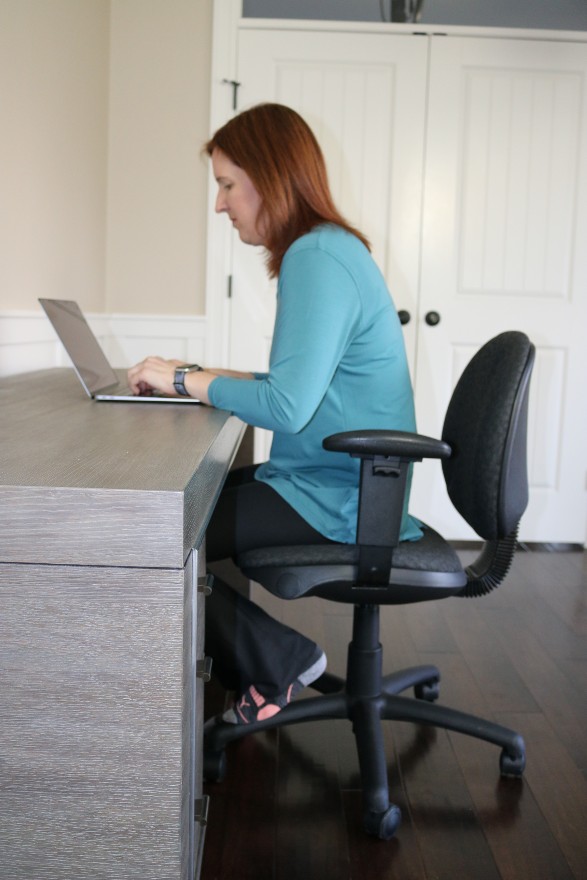
What we saw most frequently:
Notice how the upper back and shoulders are rounded and the elbows are positioned forward. Laptops typically force us to look downwards causing our chin to poke forwards and our neck to be flexed. There is no contact between the lower back and the chair.
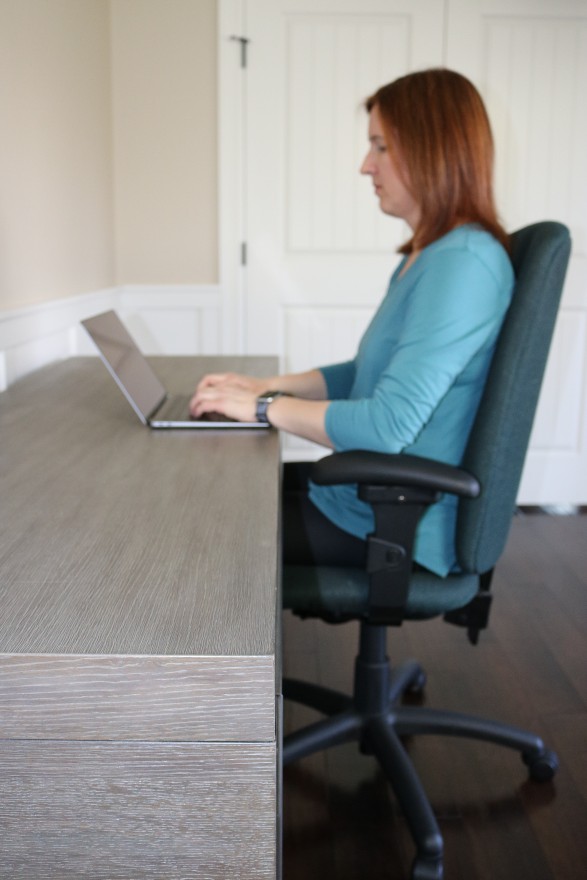
Step 1: Start at the elbows.
Ideally, your elbow should be positioned at 90 degrees, by your side, whether keyboarding or mousing. The computer mouse has a tendency to creep forwards with use, pulling your shoulder and arm forward. Use a mouse pad or place an object like a book to block its migration.
Step 2: Lumbar and Foot Support
Add a stool or riser under your feet so that your knees are level with or slightly higher than your hips.
Place a small pillow or rolled towel into the small of your back to provide lumbar support. It should be large enough so that it doesn’t allow you to slouch. Correction of posture works best starting from your low back. The rest of your spine will straighten accordingly.
“Sitting up straight” by using your muscles is not sustainable. Muscles are not designed to hold you in static positions for prolonged periods of time. Instead, our bodies are designed for movement. While sitting, take advantage of the correction that a lumbar support provides and then, get up to change positions frequently.
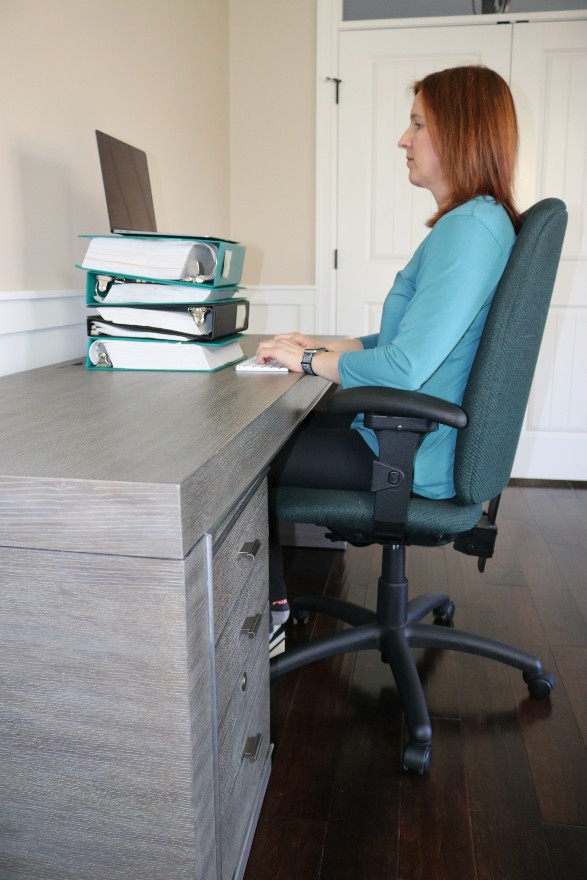
Step 3: Finish at the top!
Once the elbow, hips, knees and low back are adjusted and corrected, then the head and neck position is adjusted last. Separating the monitor from the keyboard would be ideal. Desk top computers have this benefit but laptops do not. If you are using a laptop computer, purchase a separate keyboard. Raise the monitor on books, binders or blocks so that the top 1/3 of the monitor is level with your eyes. If using multiple screens, place the screen you are looking at the most in front of you with the lesser-used screen slightly off to one side. This will reduce the amount of prolonged neck rotation to one side.
Here are some common questions asked of us during our assessments:
Question: Is sitting on a stability ball beneficial?

Answer: You can slouch on a stability ball just as easily as on a chair and trying to sit straight without slouching could produce long periods of static muscle contraction that can be fatiguing and eventually uncomfortable. One drawback with stability balls was some people would remain sitting longer without getting up to move.
Question: Is a standing work station better than sitting?
Answer: Long periods of standing without moving can be equally difficult for our bodies as long periods of sitting. The best solution is a changing work station where you can switch between the two frequently.
Question: How often should I change positions?
Answer: As often as possible! Movement for our bodies will always be far more healthy than remaining in one position regardless of the best ergonomic set up. We joke sometimes with our patients that the best office chair is the one that is most uncomfortable, like a 3 legged wooden stool! Why? It is so uncomfortable that it forces the worker to walk away frequently. The more comfortable the chair, the longer the worker will stay sitting!
We realize that many occupations today require long periods of time spent at the desk and computer. And frequent changes of positions is not always possible. If you have the option of doing so but if you forget, then set a reminder on your phone every 15 minutes to take an “active break” even if for 1 minute. We have an abundance of simple exercises you can perform while sitting if getting up from your chair is not an option (but this is beyond the scope of this blog).
References:
1. Lee, S., De Barros, F.C., De Castro, C.S., & De Oliveira Sato, T. (2020). Effect of an ergonomic intervention involving workstation adjustments on musculoskeletal pain in office workers—a randomized controlled clinical trial. Industrial Health, 59(2), 78-85. doi: 10.2486/indhealth.2020-0188
Submitted by Katelyn Rennie and Albert Chan